
1
Consent
2
Authorize
3
Complete
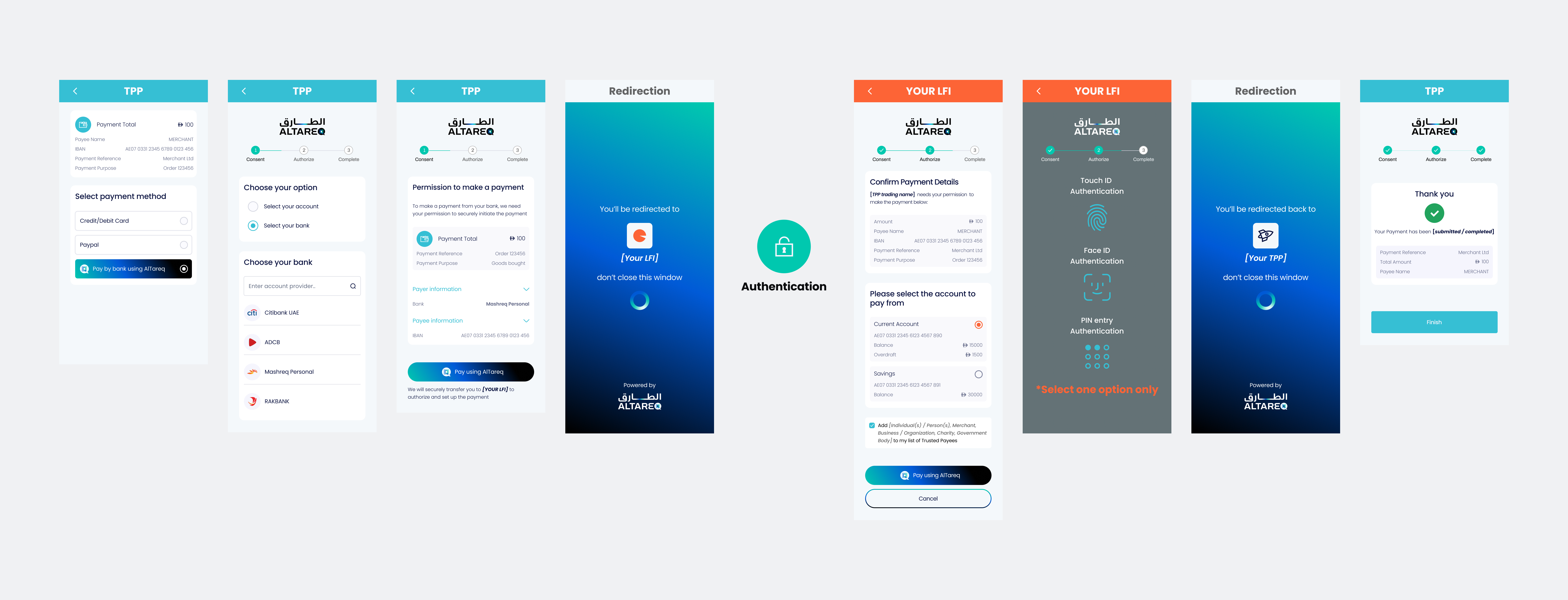
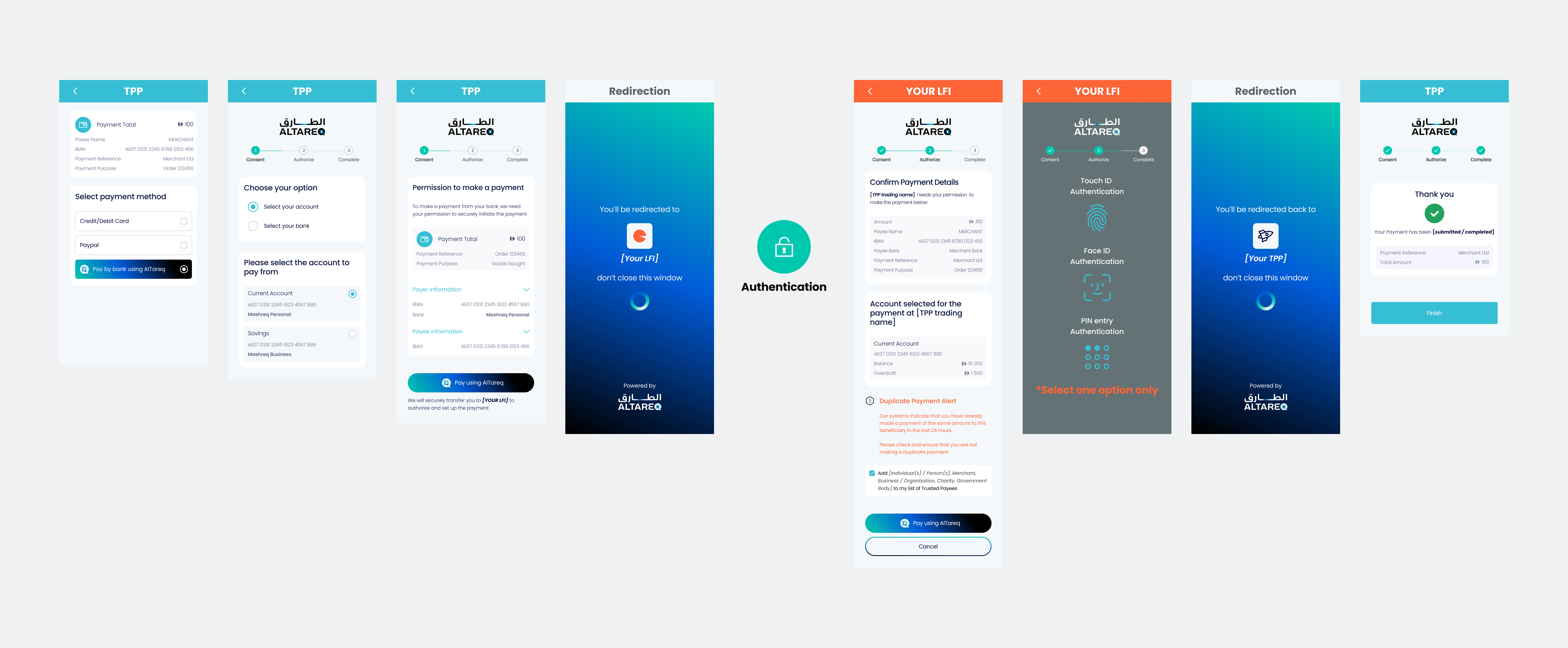
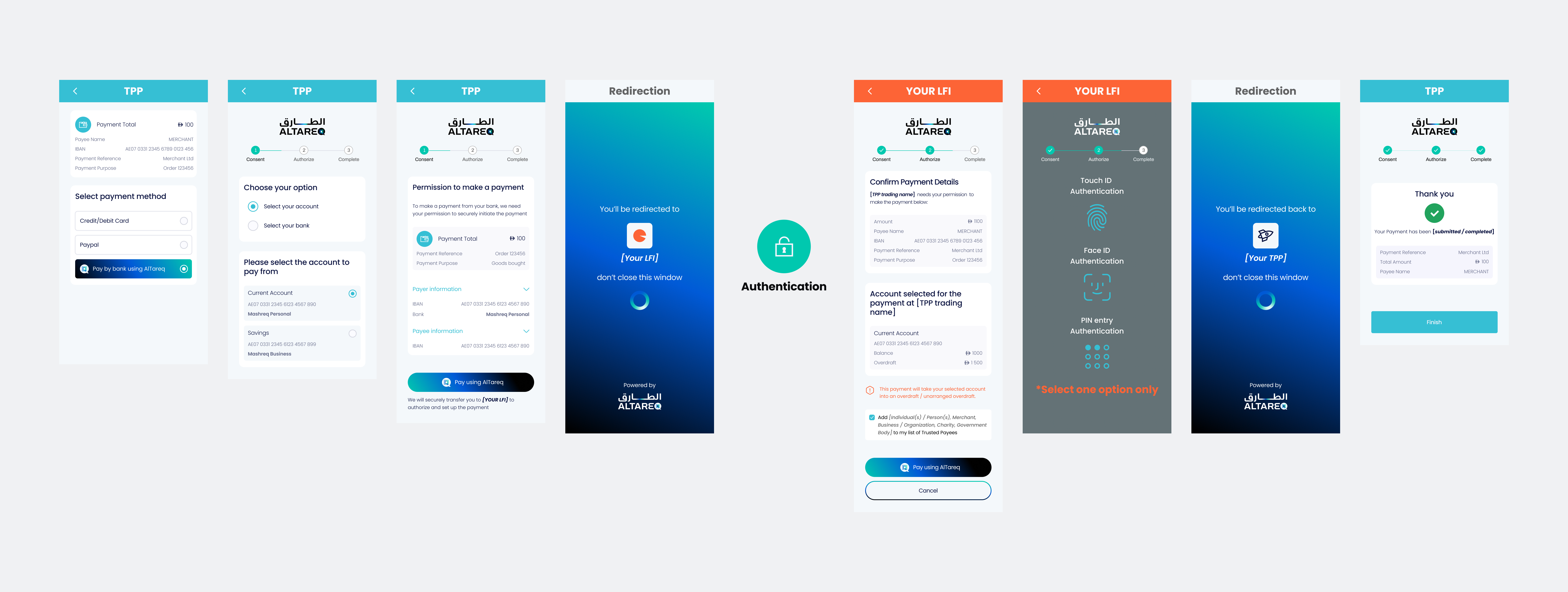
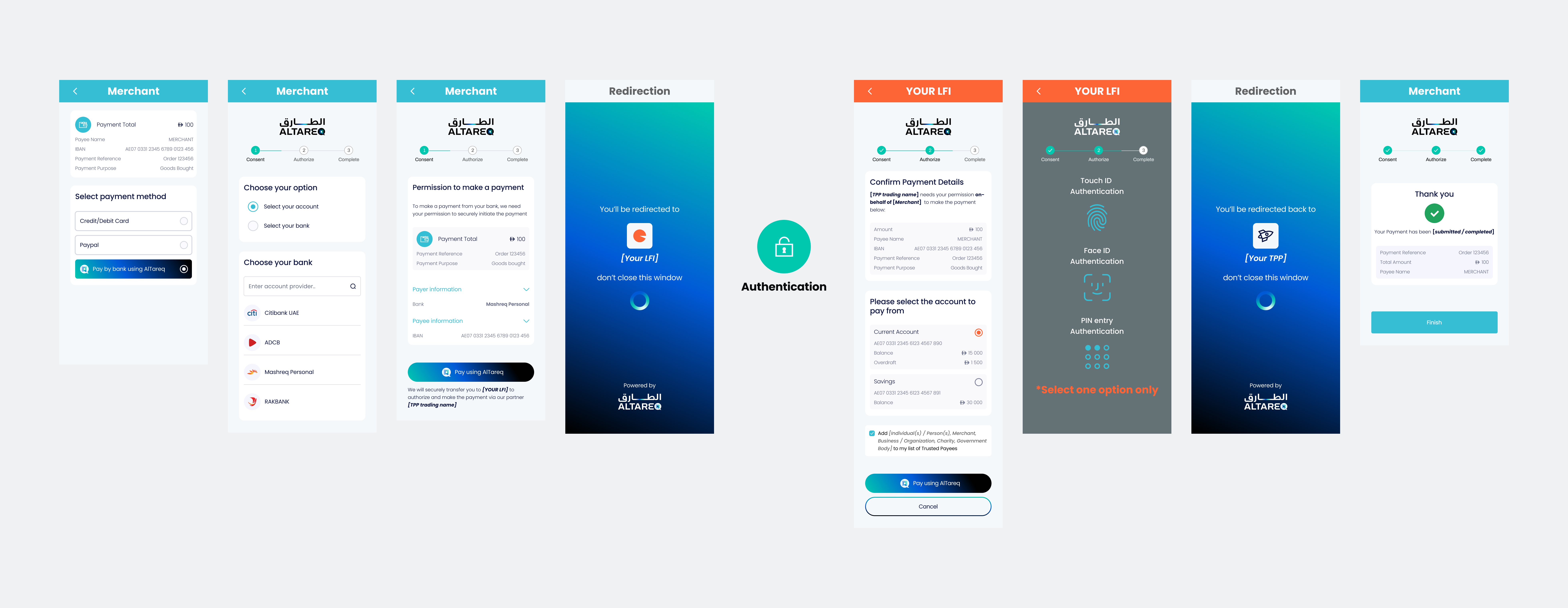
Before a customer authorises a payment through Open Finance, you must present a Consent Page that clearly explains the payment they are consenting to. This page must accurately reflect the payee, amount, schedule, and all material terms of the payment consent. The examples and interactive wireframes below define the expected structure, content, and behaviour of the Consent Page and must be followed.
While you may adapt visual elements such as colour palette, fonts, and styling, you must not alter the meaning, clarity, or completeness of the payment information shown, and the representation of AlTareq (including logos, naming, and action buttons) must be preserved. The customer must always be able to clearly understand what payment they are consenting to and that it is part of the AlTareq ecosystem. Your Consent Page must be submitted as part of CX certification prior to production, and any material changes to a production Consent Page must be re-submitted for review and approval.
Customise the request body fields below and watch the Consent and Authorisation page previews update live.
Configure the mock accounts the authenticated user holds at their bank. The Authorisation Page will offer these accounts when the user picks a debtor account, or validate the Initiation.DebtorAccount against them when one is pre-selected by the TPP.
The presence or absence of Initiation.DebtorAccount in domestic_payment_pii determines whether the user selects their account at the LFI or if it is pre-selected by the TPP.
Passing a DebtorAccount reduces friction for users who have already selected their account within the TPP's own interface, but removes the user's ability to choose a different account at the LFI.
When a TPP processes payments on behalf of a merchant (e.g. a payment aggregator), Risk.CreditorIndicators.MerchantDetails.MerchantName can be passed to identify the merchant to the user on the LFI Authorisation Page.
Risk.CreditorIndicators.MerchantDetails.MerchantName | LFI Authorisation Page Behaviour |
|---|---|
| Passed in | The merchant name is displayed on the Authorisation Page alongside the creditor details, indicating that the payment is being made on behalf of that merchant. (See Example 4) |
| Not passed in | No merchant information is shown. Only the creditor details are displayed. (See Examples 1, 2 & 3) |
The presence or absence of creditors in Initiation.Creditor in domestic_payment_pii determines how the LFI presents payment recipient information to the user.
Initiation.Creditor | LFI Authorisation Page Behaviour |
|---|---|
| 1 creditor | The single payee's name and account details are displayed under "Who you're paying". (See Example 1) |
| 2–10 defined creditors | Not Supported |
| Undefined (absent or empty) | Not Supported |
The wording of the "Add to my list of Trusted Payees" checkbox is driven by Initiation.Creditor[].CreditorAccount.Type in domestic_payment_pii. Whether the checkbox is shown at all is a separate, account-driven behaviour — see Trusted Payees under UI Behaviour Driven by Account State.
CreditorAccount.Type | Checkbox Text |
|---|---|
Individual | Add person to my list of Trusted Payees |
Merchant | Add merchant to my list of Trusted Payees |
Business | Add business to my list of Trusted Payees |
Charity | Add charity to my list of Trusted Payees |
GovernmentBody | Add government body to my list of Trusted Payees |
Other or not provided | Add to my list of Trusted Payees |
The table below describes the text shown to users on the Consent Page.
| Permissions | Text shown to user on Consent Page |
|---|---|
ReadAccountsBasic | You also grant us permission to access your account details before making the payment. |
ReadAccountsDetail | You also grant us permission to access your account details before making the payment. |
ReadRefundAccount | You also grant us permission to access your account details in order to process a refund. |
ReadAccountsBasicReadAccountsDetail | You also grant us permission to access your account details before making the payment. |
ReadAccountsBasicReadBalances | You also grant us permission to access your account details and balance before making the payment. |
ReadAccountsBasicReadRefundAccount | You also grant us permission to access your account details before making the payment, as well as to process refunds. |
ReadAccountsDetailReadBalances | You also grant us permission to access your account details and balance before making the payment. |
ReadAccountsDetailReadRefundAccount | You also grant us permission to access your account details before making the payment, as well as to process refunds. |
ReadAccountsBasicReadAccountsDetailReadBalances | You also grant us permission to access your account details and balance before making the payment. |
ReadAccountsBasicReadAccountsDetailReadRefundAccount | You also grant us permission to access your account details before making the payment, as well as to process refunds. |
ReadAccountsBasicReadBalancesReadRefundAccount | You also grant us permission to access your account details and balance before making the payment, as well as to process refunds. |
ReadAccountsDetailReadBalancesReadRefundAccount | You also grant us permission to access your account details and balance before making the payment, as well as to process refunds. |
ReadAccountsBasicReadAccountsDetailReadBalancesReadRefundAccount | You also grant us permission to access your account details and balance before making the payment, as well as to process refunds. |
Some Authorisation Page behaviours are not driven by fields in the consent request — they are driven by the customer's account state or account-level settings at the LFI. The TPP cannot control these; the LFI determines them at the point of authorisation.
Use the Simulated Accounts Behaviour panel above to preview each state.
The LFI may surface one of three warnings on the Authorisation Page based on the account and payment state. Only one warning is shown at a time, with the following priority order:
| Priority | Warning | Warning Text |
|---|---|---|
| 1 (highest) | Payment Limit Exceeded | Payment limit exceeded — The amount exceeds the payment limit you've set on your account. You may need to change your settings or try a smaller amount. |
| 2 | Overdraft | This payment will take your selected account into an overdraft/unarranged overdraft. |
| 3 | Duplicate Payment Alert | Duplicate Payment Alert — Our systems indicate that you have already made a payment of the same amount to this beneficiary in the last 24 hours. Please check and ensure that you are not making a duplicate payment. |
If a higher-priority warning applies, lower-priority warnings are suppressed. For example, if both a payment limit breach and a duplicate are detected, only the Payment Limit Exceeded warning is shown.
The LFI shows the "Add to my list of Trusted Payees" checkbox only if the creditor is not already a trusted payee on the customer's account. If the creditor is already a trusted payee, the checkbox is suppressed. The wording of the checkbox label is driven by an API field — see Trusted Payees Wording under UI Behaviour Driven by API Fields.
| Creditor status on the customer's account | Authorisation Page Behaviour |
|---|---|
| Not already a trusted payee | The checkbox is shown. |
| Already a trusted payee | The checkbox is suppressed. |